
About
This is a website for publishing and hosting my vectorized renditions of old propaganda posters and political artwork. I do not endorse any organizations or ideologies who created, or are represented in, the posters: this is purely for aesthetic purposes, and to give me something to mindlessly work on while I'm on lockdown for coronavirus.
What's the point?
I enjoy old propaganda posters and learning about the history behind them: they provide a unique snapshot into the aesthetics and priorities of a society at a given time. Aspects like the choice of font, color, and included objects are often deeply symbolic within the context of the culture that produced it. Unfortunately, it's often the case that images of such art are low resolution, exhibit compression artifacts or other image defects, are warped, or are otherwise degraded in quality. In addition to making it more difficult for other artists to use and modify such art, the art just doesn't look very clean, and that bothers me, especially when I really like the design.
Why vectorization?
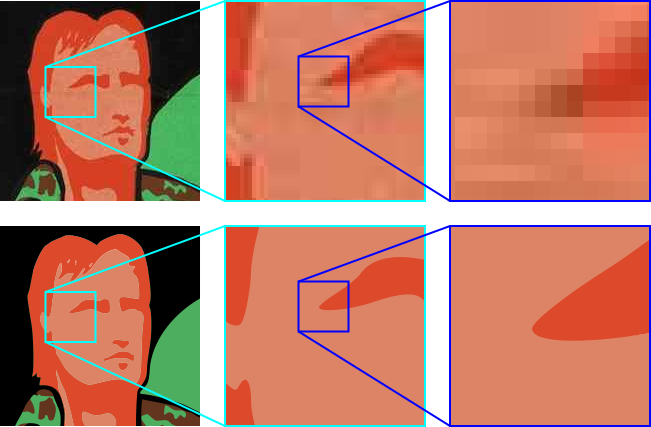
Vector graphics are fundamentally different from the more common raster graphics that most people are familiar with (e.g. PNG, JPEG, TIF). While raster graphics are comprised of a grid of colored pixels, vector graphics are comprised of a set of mathematically-defined geometric shapes. This enables vector graphics to have infinite resolution: no matter how much you zoom in, the graphic will always be sharp, as shown in the figure below. Another advantage of vector graphics is that in many cases, the file size is significantly smaller.
My process
The main program I use for vectorization is Inkscape, and I often use GIMP for pre-processing the image. The steps I generally take to vectorize an image are:
- Use TinEye to find the highest quality version of the image
- Use GIMP to pre-process the image. This isn't always necessary, but can include:
- Cropping the raw image
- Applying a threshold to the image
- Using the Magic Wand tool to reduce the number of colors in the image
- Use Inkscape's Trace Bitmap tool to convert the raster image into a vector graphic, and separate each color into its own layer
- Use Inkscape's node editing capabilities to remove unwanted vectorization artifacts and generally clean up the image. This is usually the time-consuming part.
- If there's text in the poster, use Font Squirrel or WhatTheFont to identify the font, and replace the text
The website
I use Jekyll as a static site generator, and the Bef Jekyll theme. For the image comparison slider, I use Juxtapose because it's simple and looks good.